 9 min read
  1602 words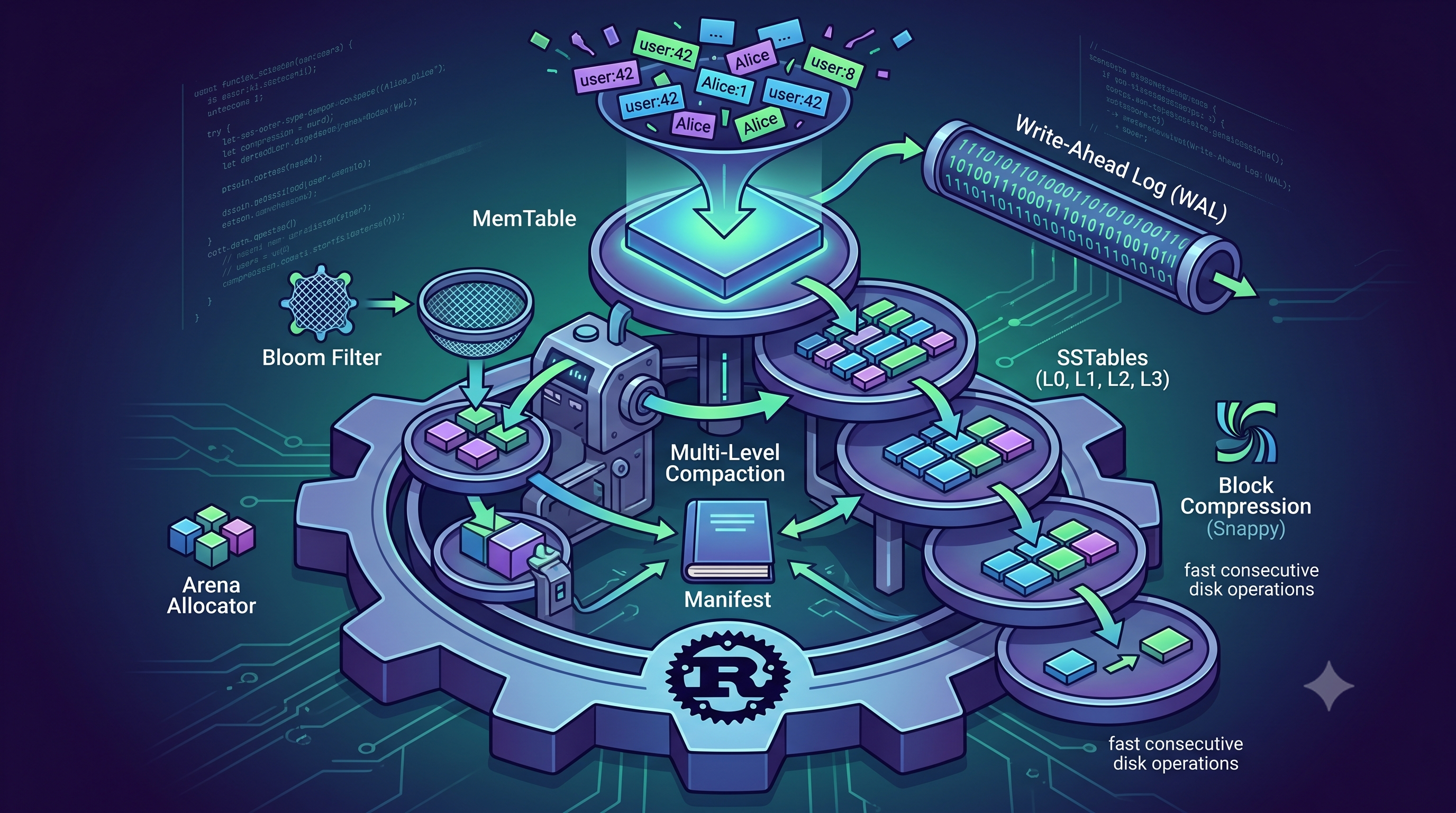
I have always been fascinated by how databases actually work under the hood. We rely on them every single day. Yet the inner mechanics of how they safely store data at high speeds can feel like magic. I wanted to demystify this process for myself. I decided the absolute best way to learn was to build my own key-value storage engine from scratch. I specifically wanted to deeply understand a concept called a Log-Structured Merge Tree. Many traditional databases use a different structure called a B-Tree. Those are excellent for finding information quickly. However, they can struggle during heavy write operations because they constantly overwrite data in random physical locations. I wanted to build a system in Rust that avoids this specific bottleneck. That pure curiosity turned into my personal learning project called lsmdb. It is a simple key-value store that turns chaotic writes into extremely fast consecutive disk operations.
Designing the Concurrency Model
The first major lesson I learned was about coordinating simultaneous actions. A storage engine has to manage incoming data and read requests all at the exact same time. If the engine stops all data traffic just to handle a single process, the entire program pauses. In software terms, this is known as lock contention. To solve this puzzle, I carefully designed the central Storage Engine coordinator. I realized I needed different synchronization tools for completely different jobs. For example, I used a strict Mutex lock for active memory operations. This guarantees a highly fair waiting line where every incoming write request gets an equal turn. On the other hand, the background disk tasks use shared references. They grab the necessary data reference and release the lock instantly. This keeps the main application running rapidly without any annoying delays.
src/lib.rs
pub struct StorageEngine {
    active_memtable: Arc<Mutex<MemTable>>,
    immutable_memtable: Arc<Mutex<Option<Arc<MemTable>>>>,
    wal: Arc<Mutex<Wal>>,
    sstables: Arc<RwLock<Vec<Vec<SSTableReader>>>>,
    manifest: Arc<RwLock<Manifest>>,
    memtable_capacity: usize,
    next_seq_num: Arc<AtomicU64>,
    db_path: Arc<PathBuf>,
    block_cache: BlockCache,
    flush_condvar: Arc<(Mutex<bool>, Condvar)>,
}
Taming Memory with a Custom SkipList
Another fascinating challenge was handling incoming data before it ever reaches the physical disk. Every new piece of data first lands in an in-memory buffer called the MemTable. Think of this as a bustling waiting room. Standard programming approaches often allocate tiny blocks of memory for every single new record. I quickly realized this creates severe memory fragmentation and wastes valuable processing time. To fix this entirely, I built a custom probabilistic SkipList. I paired this data structure with a highly specialized Arena allocator. This allocator grabs a giant block of memory upfront. It then tightly packs new data right next to each other sequentially. Building this taught me how to achieve incredibly fast memory access while eliminating wasted overhead completely.
src/memtable/skiplist.rs
#[repr(C)]
struct Node<K, V> {
    key: K,
    value: V,
    height: usize,
}

impl<K, V> Node<K, V> {
    #[inline]
    fn next_array_offset() -> usize {
        let base_size = std::mem::size_of::<Self>();
        let align = std::mem::align_of::<AtomicPtr<Node<K, V>>>();
        (base_size + align - 1) & !(align - 1)
    }

    fn new(key: K, value: V, height: usize, arena: &Arena) -> *mut Self {
        let offset = Self::next_array_offset();
        let size = offset + height * std::mem::size_of::<AtomicPtr<Node<K, V>>>();

        let ptr = arena.allocate(size) as *mut Self;

        unsafe {
            ptr::write(ptr, Self { key, value, height });

            let next_array = (ptr as *mut u8).add(offset) as *mut AtomicPtr<Node<K, V>>;
            for i in 0..height {
                ptr::write(next_array.add(i), AtomicPtr::new(ptr::null_mut()));
            }
        }

        ptr
    }
}
Beating Memory Fragmentation
Building the custom SkipList was only half the battle. Standard tools still fragment memory behind the scenes if you are not careful. So I designed a completely lock-free bump-pointer Arena Allocator. This strategy is like buying a massive parking garage instead of renting individual parking spaces one by one. The algorithm claims millions of bytes from the operating system instantly. It then hands out perfectly aligned pieces using a rapid atomic math calculation. It practically removed the memory allocation bottleneck entirely.
src/memtable/arena_allocator.rs
pub struct Arena {
    memory_usage: AtomicUsize,
    current_block: AtomicPtr<Block>,
    current_block_offset: AtomicUsize,
}
Surviving Power Failures
Buffering data in memory is incredibly fast but extremely dangerous. If the computer loses power unexpectedly, all that memory vanishes instantly. I wanted to guarantee that my engine never loses a single committed write. To solve this critical vulnerability, I implemented a Write-Ahead Log or WAL. Before a new piece of data ever touches the memory buffer, it is safely recorded in this log strictly on the hard drive. I used rigid physical block structures to maintain reliability. The log saves data in consecutive thirty-two kilobyte blocks. If the system crashes mid-write, a checksum failure alerts the recovery process to discard the corrupted chunk safely. Learning how to build this specific logging mechanism really showed me the harsh reality of physical hardware constraints.
src/wal.rs
#[derive(Debug, Clone, Copy)]
enum ChunkType {
    Full = 1,
    First = 2,
    Middle = 3,
    Last = 4,
}

/// A fixed-width slot inside a 32 KB WAL block.
///
/// Records that span multiple 32 KB blocks are split into First/Middle/Last chunks. This
/// lets the recovery reader reassemble records without knowing their total size upfront —
/// it reads chunks in order until it sees a `Last` (or `Full`) chunk type.
///
/// The payload is raw serialized `Record` bytes. Keeping `Chunk` unaware of `Record`
/// structure means the chunking logic is reusable for any payload and easier to test.
struct Chunk {
    pub checksum: u32,
    pub length: u16,
    pub chunk_type: ChunkType,
    pub payload: Vec<u8>,
}
Cleaning the Logs Automatically
Because every single action is safely written to the log, those files grow rapidly. I could not simply let them consume the entire hard drive forever. I built a garbage collection mechanism to handle the mess seamlessly. Once the background task successfully seals a data table onto the final disk drive, it tells the logger to permanently delete the older corresponding log files. This keeps the disk completely neat and tidy. It ensures the system only retains the exact limited history it needs to recover from a sudden crash.
Handling the Overflow
What happens when that memory buffer fills up entirely? I needed a reliable way to move the data permanently to the disk without freezing the application. I programmed a background task that takes the full memory table and writes it out as an SSTable. This stands for Sorted String Table. However, I encountered a completely new problem. What if the incoming writes are so incredibly fast that the disk cannot keep up? To handle this overflow gracefully, I utilized a CondVar constraint. If the system cannot process the files quickly enough, it intentionally parks the incoming writes in a harmless waiting area. This creates a natural back-pressure. It forces the system to stay stable instead of throwing unpredictable or fatal errors into the console.
src/lib.rs
std::thread::spawn(move || {
    if let Err(e) = Self::flush_immutable_memtable(
        imm_memtable_arc,
        sstables_arc,
        manifest_arc,
        db_path_arc,
        wal_arc
    ) {
        eprintln!("Background flush failed: {}", e);
    }
    let (mutex, condvar) = &*condvar_arc;
    let mut flushing = mutex.lock().unwrap();
    *flushing = false;
    condvar.notify_all();
});
Filtering the Noise with Bloom Filters
When I started running read operations, I noticed something highly concerning. If a user searched for a key that did not exist, the engine would waste incredible amounts of time searching through every single disk file. To save the database from these pointless disk reads, I learned about and implemented a Bloom Filter. This is a special probabilistic data structure. It uses an incredibly clever double-hashing math trick. It can instantly tell you if a key is definitely missing in just a few micro-operations. By embedding these into every file, I managed to eliminate almost ninety-nine percent of unnecessary physical disk reads.
src/bloom_filter.rs
/// Returns `false` if the key is **definitely** absent. Returns `true` if it **might** exist.
pub fn contains(&self, key: &[u8]) -> bool {
    let hash = Self::hash_key(key);
    let h1 = (hash & 0xFFFFFFFF) as u32;
    let h2 = (hash >> 32) as u32;

    let m = self.bits.len();
    if m == 0 {
        return false;
    }

    for i in 0..self.k_num_hashes {
        let bit_idx = (h1 as u64 + (i as u64).wrapping_mul(h2 as u64)) as usize % m;
        // One clear bit is enough to prove absence — no need to check the remaining hashes.
        if !self.bits.get(bit_idx).unwrap_or(false) {
            return false;
        }
    }

    true
}
Merging Data with Multi-Level Compaction
Because this system never overwrites data directly, old data and deleted records start piling up constantly. It is exactly like having an overflowing trash bin full of outdated drafts. I solved this by building a background compaction system. As files multiply over time, a multi-level merge kicks in automatically. It takes the oldest files and merges them together using a smart sorting technique. If it sees a deleted record, it permanently erases it and frees up the actual disk space. This guarantees that the storage size remains incredibly lean no matter how long the database runs.
Tracking State with the Manifest
Another major technical hurdle was keeping track of all these newly created and merged files perfectly. If the power fails during a massive compaction merge, how does the system know which files are actually safe to use upon restart? I needed an absolute source of truth. I built a persistent system tracker called the Manifest. Every time a new file is born or an old file is deleted, the Manifest records a tiny delta update. When the database boots up, it reads this Manifest log like an unalterable history book. This cleanly reconstructs the state and completely prevents corrupted ghost files from destroying the data integrity.
src/sstable/manifest.rs
pub struct Manifest {
    file: File,
}

impl Manifest {
    /// Opens the Manifest log in append mode. Creates it if it doesn't exist.
    pub fn open(path: impl AsRef<Path>) -> Result<Self, anyhow::Error> {
        let file = OpenOptions::new().create(true).append(true).open(path)?;

        Ok(Self { file })
    }

    /// Logs a specific state mutation (e.g. creating a Level 0 table, or merging tables to Level 1).
    pub fn log_edit(&mut self, edit: &VersionEdit) -> Result<(), anyhow::Error> {
        let bytes = edit.to_bytes();
        self.file.write_all(&bytes)?;
        self.file.sync_data()?;
        Ok(())
    }
}
Speeding Up Reads with an LRU Cache
As I tested the read path, I realized retrieving the same data multiple times was forcing the engine to fetch the same blocks from the disk repeatedly. This felt incredibly inefficient. To solve this, I added an in-memory block cache. I configured it to hold the most recently used blocks in prime memory space. If a previously accessed piece of data is requested again, the engine simply grabs it directly from this cache. This completely skips the heavy penalty of paging from the storage drive. It drastically improved the performance for frequently accessed data.
Shrinking Data with Block Compression
Physical disk space is a precious resource. I wanted the engine to store as much data as humanly possible without bloating the hard drive. I integrated Snappy compression into the data block pipeline. Before any block ever reaches the disk, the engine compresses it. When reading it back, it decompresses the block instantly. I designed the file format with a special forward-compatible byte exactly for this. It tells the reader how to unpack the data seamlessly. This significantly reduced the overall disk footprint with almost zero noticeable speed penalty.
src/sstable/compaction.rs
// Reads the 1-byte compression type sentinel written by SSTableBuilder and decompresses.
// Returning None (instead of panicking) on an unknown type makes the reader forward-compatible:
// a file written by a future version of lsmdb with a new compressor can be gracefully skipped
// rather than crashing all existing readers.
fn decompress_block(raw_block: &[u8]) -> Option<Vec<u8>> {
    let compression_type = raw_block[0];
    let payload = &raw_block[1..];
    match compression_type {
        t if t == COMPRESSION_SNAPPY => snap::raw::Decoder::new().decompress_vec(payload).ok(),
        t if t == COMPRESSION_NONE => Some(payload.to_vec()),
        _ => None,
    }
}
Squeezing Keys with Prefix Encoding
While looking closely at the stored keys, I noticed another area for optimization. Many keys often share the exact same starting letters. Storing those repeated prefixes over and over seemed terribly wasteful. I implemented a prefix compression technique inside the data blocks. Each new key only stores the specific bytes that differ from the key right before it. To make sure reading through a block remains fast, I added periodic uncompressed restart points. Building this logic pushed my byte manipulation skills to the test and successfully squeezed even more data into every kilobyte.
Seeing It In Action
Building an entire LSM-Tree from scratch was an incredibly rewarding experience. It bridged the gap between abstract computer science concepts and raw hardware reality. I learned exactly why simple sequential operations on a disk can be wonderfully fast. To make testing much easier, I also built a small interactive CLI tool. This allows anyone to manually insert and retrieve data directly. Watching the engine blaze through operations in raw microseconds is immensely satisfying. I highly encourage you to build your own mini database if you want to truly understand how data is born, moved, and securely stored.
use lsmdb::StorageEngine;

// Open (or create) a database at the given path.
let engine = StorageEngine::open("./my_db")?;

// Write
engine.put("user:42", "Alice")?;

// Read
if let Some(val) = engine.get("user:42")? {
    println!("{}", String::from_utf8_lossy(&val)); // "Alice"
}

// Delete (tombstone — space recovered during compaction)
engine.remove("user:42")?;